ClipKitty
Why ClipKitty
Most clipboard managers work fine when your history is small. Then the thing you need is from last week, from another device, or buried under a hundred other clips.
ClipKitty is built around a simple idea: your clipboard can remember more without asking more from you.
Features
-
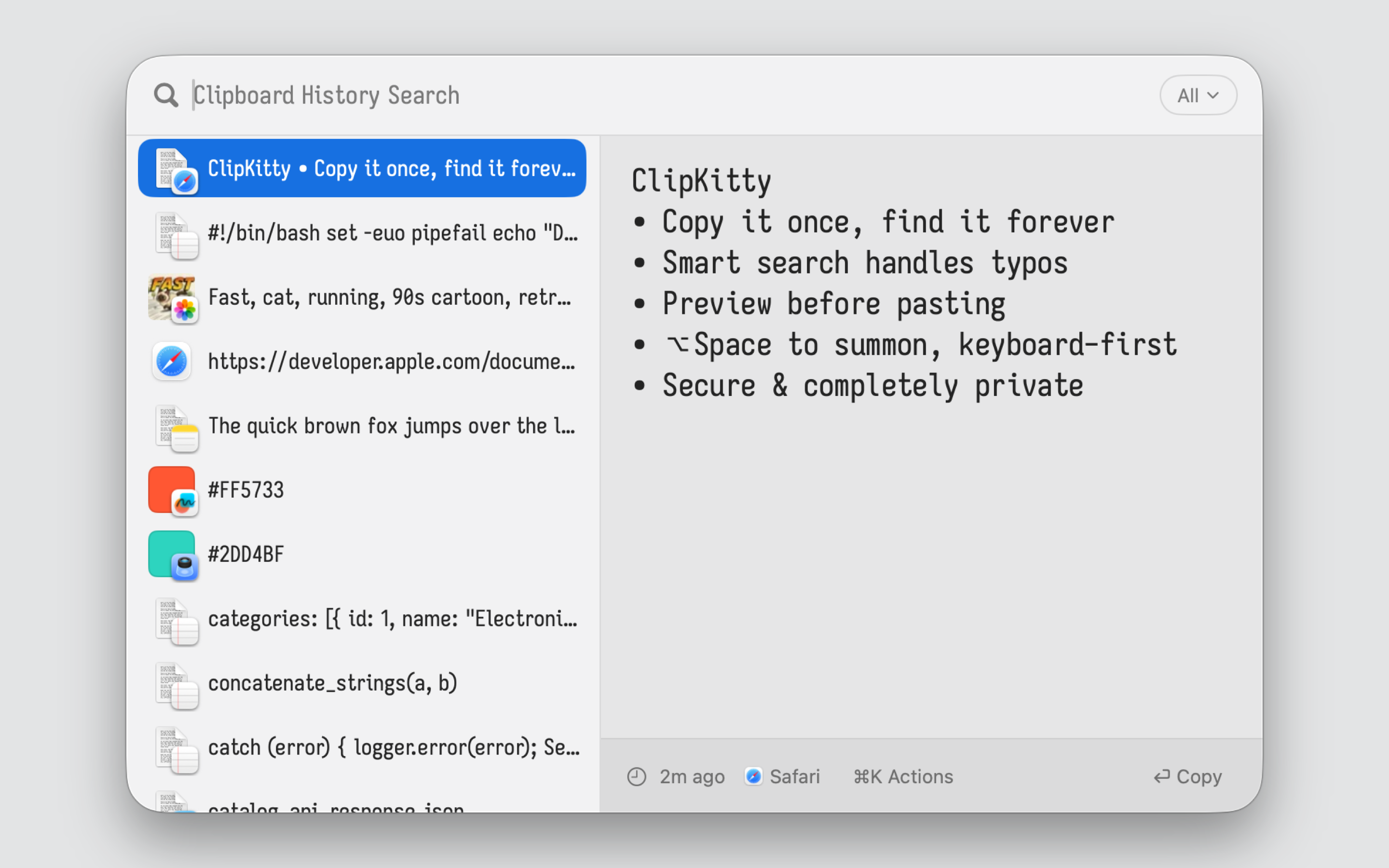
Copy it once; find it forever. Keep a deep history of text, links, images, files, code, and colors without turning your clipboard into another thing to manage.
-
Search what you remember: Type a few words, fragments, or even a typo. ClipKitty helps you find the right item fast, even when your search is incomplete or misspelled.
-
Preview before you paste: See full text, code, images, colors, links, and files before using them. No guessing from tiny cut-off snippets.
-
Pick up from any device: Turn on iCloud Sync and your clipboard history follows you across Mac, iPhone, and iPad. Copy on one device, search on another, and keep the clips you rely on wherever you work.
-
Private by default: No accounts. No telemetry. No third-party servers. Your clipboard history stays on-device unless you enable iCloud Sync; synced clips use Apple's private CloudKit database, with no developer access.
-
Don’t take our word for it: ClipKitty is open source, empowering anyone to verify its privacy and behavior claims against the public code. Build attestations cryptographically link each release back to the public source code.
Installation
Mac App Store

Manual download
- Download the latest DMG from GitHub Releases.
- Drag ClipKitty to your Applications folder.
- Open ClipKitty and grant clipboard/accessibility permissions if prompted.
Alternatives
| ClipKitty | |
|---|---|
| vs Maccy | Same simplicity, no limits. Maccy caps at 200 items and makes you wait on tooltips to view your history. ClipKitty scales to millions, comes with instant live preview, and syncs securely via iCloud. |
| vs Raycast | Same speed, better search, no expiration. Raycast doesn't save long clips and offers limited search only. Its free tier expires after 3 months; sync requires a paid subscription. ClipKitty preserves everything forever, syncs via iCloud for free, and finds items more reliably with smarter, typo tolerant search. |
| vs Paste | Same utility, no subscription. Paste charges $30/year. You own ClipKitty outright. Plus ClipKitty ships with an intuitive list with instant live preview, vs paste's horizontal carousel. |
Behind the Scenes
How Search Works
Clipboard search sounds simple until you ask for the version people actually want:
- history can grow for months or years
- typos still work, because memory is fuzzy and fingers are worse
- highlighting that reflects which words matched
- search updates on every keystroke
- huge clips, logs, stack traces, and source files stay searchable in full
The obvious baseline is to iterate over every item, for every query. This stops working with thousands of items, and it really stops working when some items are hundreds of kilobytes or megabytes long. Maccy does this, and the limitations are why its history is capped at 200 items, and why it freezes if you copy a long item.
The smarter move is indexing. Instead of doing all the work when the user types, do some of it earlier, when an item is saved. Build a structure that says "this word appears over here", so a query can jump to likely matches instead of rereading the whole clipboard.
The simplest index is a prefix tree over the words at the start of each item. This is what Raycast uses for clipboard history. It is fast, and it supports much longer histories than scanning. But the tradeoff shows up in the UX: it only finds exact matches at the exact start of an item. If you copied docker compose exec api rails console, searching rails console should find it. A start-only index misses it. It also breaks typo tolerance: Raycast finds nothing for improt when the item says import.
ClipKitty uses a trigram-based index for candidate recall. A trigram is a three-character slice of text: import contains imp, mpo, por, and ort. At query time, it uses those precomputed slices to follow posting lists to likely matches. This is fast, but it is still an approximation: shared trigrams are not the same as a good human match.
To mitigate those weaknesses, ClipKitty takes the best trigram matches and then reranks them separately. Because this is already a much smaller set, ClipKitty can afford to spend more compute approximating what a human would call "the good match", not just what shares characters with the query.
The reranker first tokenizes the query and the candidate clip into words, then tries to align each query word to one real word in the clip.
Each possible word match is graded by how trustworthy it is. Exact matches are best. Prefix matches are very good, because the user may still be typing. camelCase and digit-boundary matches count as subword prefixes, so loader can match PreviewLoader and address can match IPv6Address. Ordinary substrings count for less, because they are often accidental. Typos are not all treated the same either: adjacent transpositions and repeated-key mistakes are common finger errors, so they beat generic substitutions, and multi-edit guesses are weaker still. Short words get less forgiveness because a one-letter change in cat can easily become a different word, while a one-letter change in postgres is probably just a typo.
Then it asks whether the whole alignment looks like something a person would have picked. Did most of the important query words match? Are they in the same order? Are they close together, or scattered across a giant log? A compact phrase match usually feels intentional. A distant match across thousands of characters usually feels suspicious, even if every word technically appears.
Those signals get turned into a small ordered score: coarse match quality first, then human-scale recency buckets like last hour, day, week, month, and quarter, then the finer match quality differences. Clipboard history is temporal, so recency should matter a lot, but not so much that a weak recent match beats the obvious phrase from yesterday. The result is that rails console inside docker compose exec api rails console beats a random clip with rails near the top and console far away, while improt can still find import without letting every vaguely similar word jump the line.
The important idea is that search quality does not come from doing expensive work on everything. It comes from doing cheap work to find plausible candidates, then doing expensive work only where it can change what the user sees.